A Beginner’s Guide to Membit Staking
Membit’s staking system is designed to both boost your points and protect the platform from bots. By joining the staking program alongside the community program, you can maximize your points while helping the system clearly distinguish between real users and automated accounts.
Membit’s staking system is designed to both boost your points and protect the platform from bots. By joining the staking program alongside the community program, you can maximize your points while helping the system clearly distinguish between real users and automated accounts. We also understand that many hunters may be new to the Band ecosystem.
You might be asking: What is BandChain? What is a hardware wallet? Why should I stake? How do I actually do it?
This guide is here to answer those questions. It will walk you through the background, key concepts, and the entire staking process step-by-step, from setting up your first wallet, delegating BAND to a validator, to pairing your wallet to your Membit account.
Background: Why Staking Matters in Membit
Before jumping into the step-by-step guide, it’s important to understand why staking BAND is part of the Membit experience and how it helps protect the system's integrity.
What Is BandChain?
BandChain is Band’s own blockchain, similar to how Ethereum or Solana have their own independent networks. The key difference is that BandChain is purpose-built to deliver fast, secure, and decentralized real world assets price data to applications. When you stake BAND on BandChain, you are helping secure the network and the data that powers applications using Band Price Feeds.
What Is a Band Wallet?
To interact with BandChain, you need a compatible wallet. While different providers offer different interfaces and features, the core concept is the same: a wallet is the tool you use to store, manage, and access your assets, in this case, BAND tokens. For simplicity, wallets can be grouped into two types:
- Software wallets (ex., Leap, Keplr, Cosmostation): These are mobile apps or browser extensions. They are easy to use and suitable for beginners.
- Hardware wallets: These store your crypto offline and provide the highest level of security. Only Ledger wallets are compatible with BandChain at this moment.
Your wallet also generates a seed phrase, which acts as the master key to your funds. It is critical to keep your seed phrase safe and never share it with anyone.
Why Does Membit Staking Matter?
Membit’s rewards system is designed to encourage real community participation. To prevent bots from creating accounts and unfairly farming points, Hunters can start small by staking only 10 BAND. Staking provides several benefits:
1. It strengthens the ecosystem by discouraging Sybil attacks. Bots lose their advantage when participation requires a real stake
2. It rewards people who believe in the ecosystem. Those who stake BAND not only earn ~18% APY but also unlock significant Bonus Points Boost on their Membit points.
3. It secures Membit and disempowers bad actors. Staking aligns incentives so Hunters contribute responsibly while filtering out harmful behavior.
By tying participation to real commitment, it reduces fake posts, fraud, and manipulation attempts. In short, staking benefits both you and the ecosystem.
How Staking Works in Simple Terms
When you stake BAND, you “delegate” your tokens to a validator. Validators are responsible for running the infrastructure of BandChain, and your stake strengthens the network’s security. You retain full ownership of your tokens. They are simply locked while staked. You can unstake at any time, but there is a 21-day unbonding period before the tokens become available again.
Step 1: Set Up Your Band Wallet
Membit staking runs on BandChain, Band's own blockchain. To interact with BandChain, you need a wallet that supports it. Recommended wallets:
- Leap Wallet: https://www.leapwallet.io
- Keplr Wallet: https://www.keplr.app
- Cosmostation: https://www.cosmostation.io/
- Ledger (hardware wallet)
Choose the wallet that fits your needs, follow the setup instructions provided by the wallet app, and keep your seed phrase safe. Remember the motto: Not your keys, not your coins. This applies with Membit as well! Once your wallet is created, you’re ready for the next step.
Step 2: Connect Your Wallet to "My Membit" Dashboard
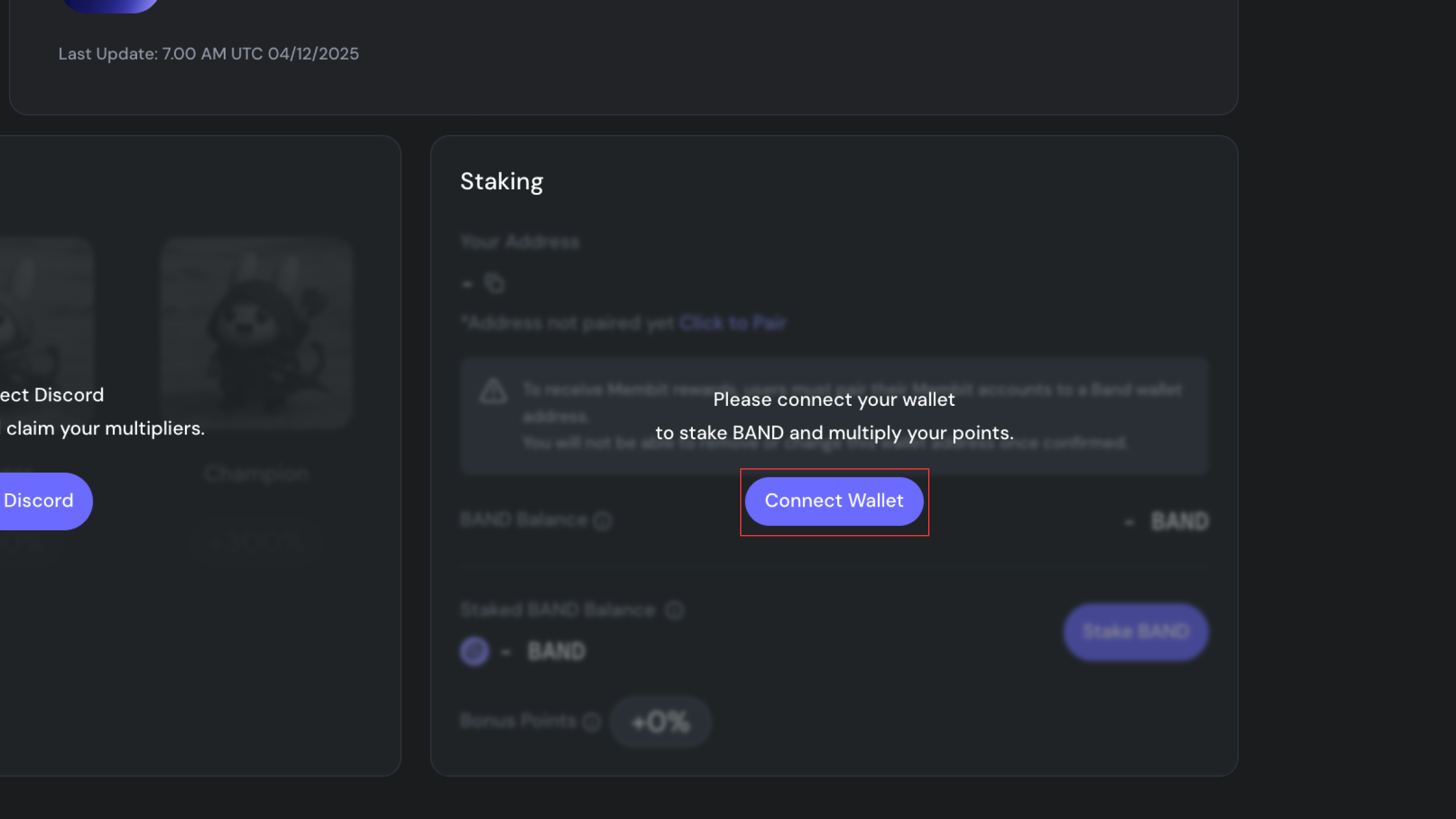
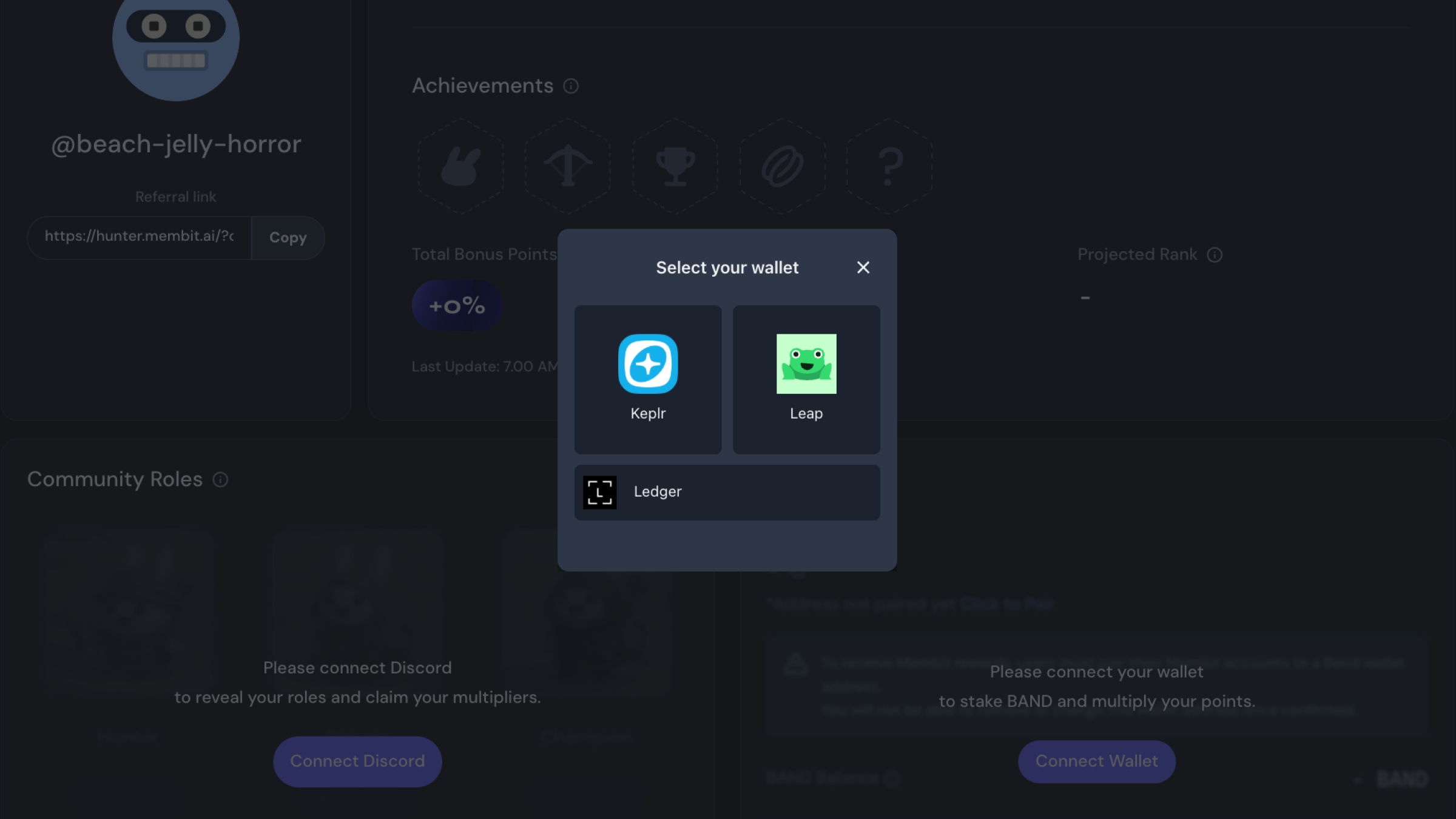
- Visit My Membit Dashboard: https://hunter.membit.ai/dashboard
- Scroll down to the Connect Wallet section
- Click Connect Wallet
- Choose your wallet provider and approve the connection
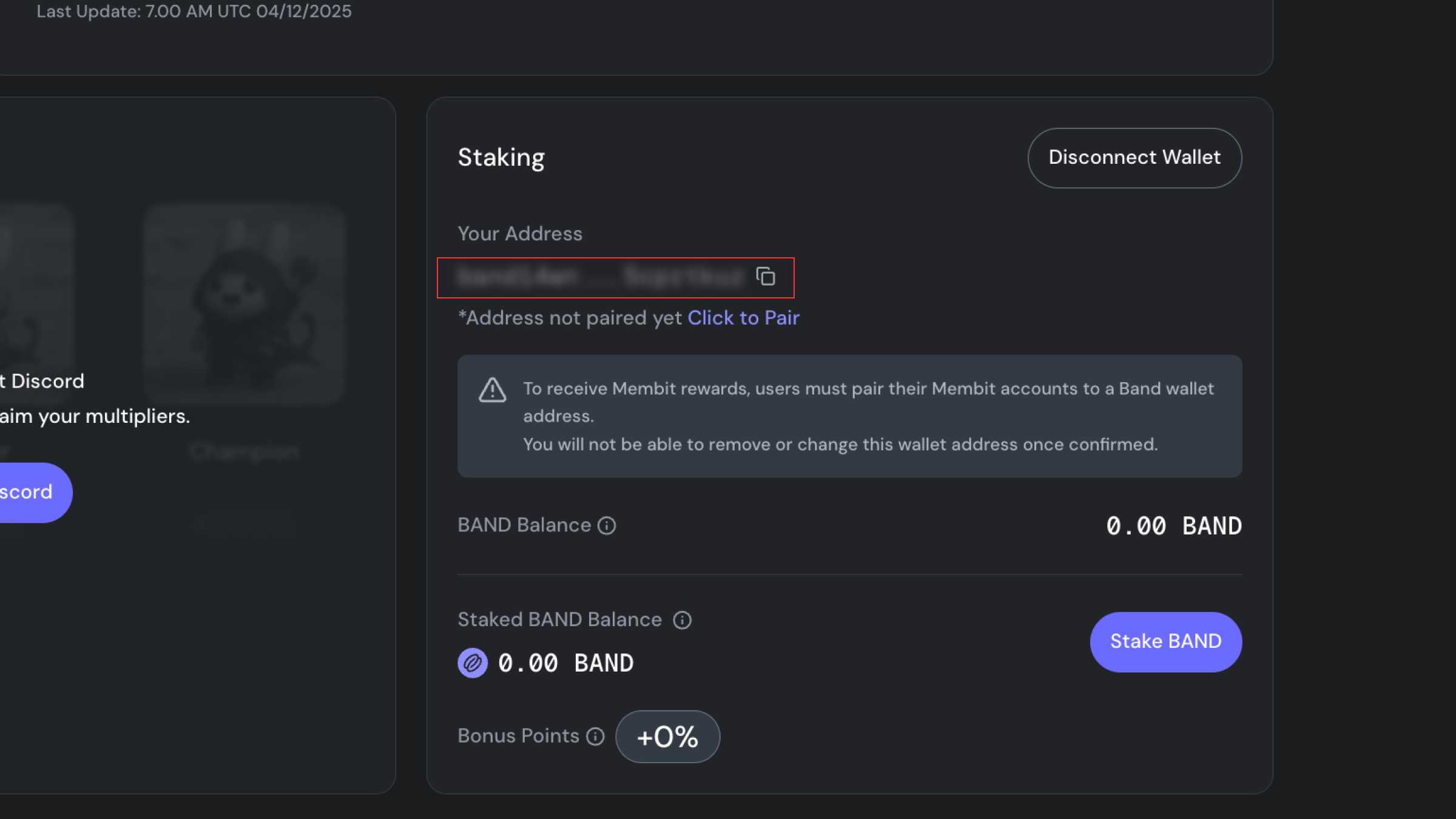
- Copy your BandChain wallet address shown on the dashboard. You’ll use it for withdrawing BAND from exchanges.
Step 3: Get Your First $BAND (Optional)
The easiest way to get BAND for beginners is through centralized exchanges. If you already have BAND, you can skip this step. Otherwise, you can buy BAND from major exchanges that support the BAND native network, such as:
- Binance
- KuCoin
- Gate.io
- or other supported local/global exchanges
⚠️ Important: When withdrawing BAND from an exchange, make sure you select BandChain as the network. Do not choose BEP20 or ERC20. Once the withdrawal is complete, your BAND will appear in your wallet.
Recommended amount
You need at least 10 BAND to activate Staking Bonus Points. We suggest withdrawing slightly more than 10 BAND so you have extra for the small transaction fee.
Step 4: Start Staking
In this stage, you should already have BAND in your wallet balance. In this process, we've prepared a 1-minute video to show how to stake on BandChain via the My Membit dashboard:
- On the dashboard, click “Stake BAND.”
- This will redirect you to: https://www.cosmoscan.io/validators
- Browse or search for your preferred validator
- Validators differ in performance, commission, and reward policy.
- To simplify, you can pick well-known validators to get started.
- Click on the validator’s page
- Connect your wallet again if prompted
- Select “Delegate”
- Enter your stake amount and confirm the transaction
After a short processing time, your staked amount will appear in your Membit dashboard.
Bonus Points Update: Please note that your Staking Bonus Points will refresh within 24 hours after your stake becomes active. So, while waiting, enjoy staking and scrolling!
Step 5: Pair Your Wallet
In order to be eligible for rewards and for Staking Bonus Points to apply, you must pair your wallet with My Membit Dashboard. Follow these simple steps:
- In the Staking section of the dashboard, click the Pair button. Before pairing, ensure that your wallet already contains BAND.
- Please note that you can only pair one wallet to your Membit account. Make sure you select and connect the correct wallet.
- Click "Continue" to begin pairing and "Approve" the transaction in your wallet.
- Wait approximately one hour for BandChain to complete the pairing process.
- Once pairing is complete, your dashboard will display “✅ Paired” next to your wallet address.
You’re Done!
That’s all you need to start earning bonus points through Membit staking. You can complete this process within a few minutes. And now, you are fully eligible and have a full experience with Membit. This process ensures fairness, prevents bot exploitation, and supports the BandChain network at the same time. If you need further support, feel free to reach out to us on Band Discord. Our Moderators and thousands of hunters are ready to help you out! Plus, apart from the Membit Staking Program, you can earn more bonus points up to +300% via our Community Program as well. Hence, head out to our Discord and join the Hunters' Community now!
About Membit
Membit makes your endless scrolling guilt-free by plugging human context into AI, making it easy for anyone to share real-time social data and empower AI models. Just scroll, spot what’s new, and help shape what AI knows, while earning rewards along the way. With Membit, your curiosity counts. Whether you’re tracking viral trends, researching headlines, or leaning on your unique interests, Membit gives you the tools to make your impact with what you are an expert at.
More about membit: https://membit.ai
About Band
Band is the data layer that trains AI engines and powers blockchain applications. By empowering DeFi, GameFi, and AI agents, it enables developers, institutions, and users to access real-time data with zero counterparty risk. With Band’s open, battle-tested data infrastructure built for blockchains and LLMs, it ensures that real-time information is always accessible—fueling everything from financial protocols to autonomous AI systems.
Learn More about Band: https://linktr.ee/bandprotocol